OAuth مخصص
Casdoor يدعم مزودين مخصصين. ومع ذلك، يجب أن يتبع المزودون المخصصون العملية القياسية لـ OAuth ذو الثلاث أرجل، ويجب أن تتوافق قيم العودة لـ Token URL و UserInfo URL مع التنسيق المحدد من قبل Casdoor.
Overview
Custom OAuth providers allow you to integrate any OAuth 2.0 compliant authentication service with Casdoor, even if it's not officially supported. This is useful when you want to integrate with:
- Internal enterprise OAuth servers
- Self-hosted authentication systems
- Third-party services not yet officially supported by Casdoor
Multiple Custom Providers Support
Casdoor supports up to 10 different custom OAuth providers simultaneously. When creating custom providers, you can choose from the following types:
- Custom - The first custom provider
- Custom2 through Custom10 - Additional custom providers
This allows you to integrate multiple custom OAuth services without conflicts. Each custom provider maintains its own separate configuration and user data fields.
Creating a Custom Provider
To create a new custom provider, navigate to the provider page of Casdoor, and select one of the custom types ("Custom", "Custom2", "Custom3", etc.) in the Type field. ثم ستحتاج إلى ملء Client ID، Client Secret، Auth URL، Scope،Token URL، UserInfo URL، و Favicon.
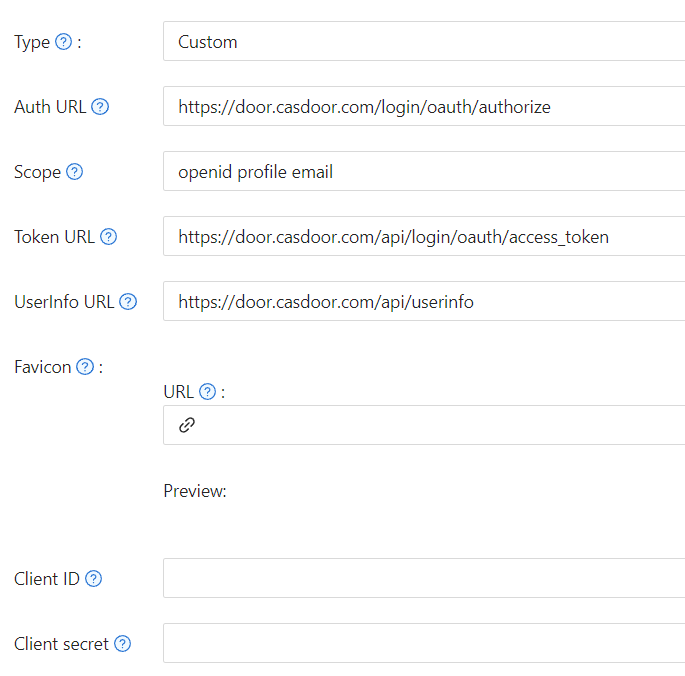
Auth URLهو عنوان صفحة تسجيل الدخول OAuth لمزود الخدمة المخصص.إذا قمت بملء
https://door.casdoor.com/login/oauth/authorizeكـAuth URL، فعندما يقوم المستخدم بتسجيل الدخول باستخدام هذا المزود المخصص، سيتم أولاً إعادة توجيه المتصفح إلىhttps://door.casdoor.com/login/oauth/authorize?client_id={ClientID}&redirect_uri=https://{your-casdoor-hostname}/callback&state={State_generated_by_Casdoor}&response_type=code&scope={Scope}بعد اكتمال التفويض، يجب أن يقوم مزود الخدمة المخصص بإعادة التوجيه إلى
https://{your-casdoor-hostname}/callback?code={code}بعد هذه الخطوة، سيتعرف Casdoor على معامل الكود في العنوان URL.
Scopeهو معامل النطاق الذي يتم حمله عند الوصول إلىAuth URL، ويجب أن تملأه وفقًا لمتطلبات مزود الخدمة المخصص.Token URLهو نقطة نهاية API للحصول على accessToken.بمجرد حصولك على الكود في الخطوة السابقة، يجب على Casdoor استخدامه للحصول على accessToken.
إذا قمت بملء
https://door.casdoor.com/api/login/oauth/access_tokenكـToken URL، فإن Casdoor سيصل إليه باستخدام الأمر التاليcurl -X POST -u "{ClientID}:{ClientSecret}" --data-binary "code={code}&grant_type=authorization_code&redirect_uri=https://{your-casdoor-hostname}/callback" https://door.casdoor.com/api/login/oauth/access_tokenيجب أن يعيد مزود الخدمة المخصص على الأقل المعلومات التالية:
{
  "access_token": "eyJhbGciOiJSUzI1NiIsImtpZCI6Ixxxxxxxxxxxxxx",
  "refresh_token": "eyJhbGciOiJSUzI1NiIsInR5cCI6xxxxxxxxxxxxxx",
  "token_type": "Bearer",
  "expires_in": 10080,
  "scope": "openid profile email"
}
UserInfo URLهو نقطة نهاية API للحصول على معلومات المستخدم عبر accessToken.إذا قمت بملء
https://door.casdoor.com/api/userinfoكـUserInfo URL، فإن Casdoor سيصل إليه باستخدام الأمر التاليcurl -X GET -H "Authorization: Bearer {accessToken}" https://door.casdoor.com/api/userinfoيجب أن يعيد مزود الخدمة المخصص على الأقل المعلومات التالية:
{
  "name": "admin",
  "preferred_username": "Admin",
  "email": "admin@example.com",
  "picture": "https://casbin.org/img/casbin.svg"
}Faviconهو عنوان URL لشعار مزود الخدمة المخصص.سيتم عرض هذا الشعار على صفحة تسجيل الدخول Casdoor مع مزودي تسجيل الدخول الآخرين من الجهات الخارجية.