RuoYi
Casdoor can be easily integrated with RuoYi-cloud.
Step 1: Deploy Casdoor
Deploy Casdoor. See Server installation. Ensure the server is running (e.g. http://localhost:8000) and you can open the login page (e.g. http://localhost:7001) and sign in with admin / 123.
Step 2: Configure Casdoor
Configure an organization, an application, and the Synchronizer in Casdoor. Notes:
- When editing the syncer, check the table columns:
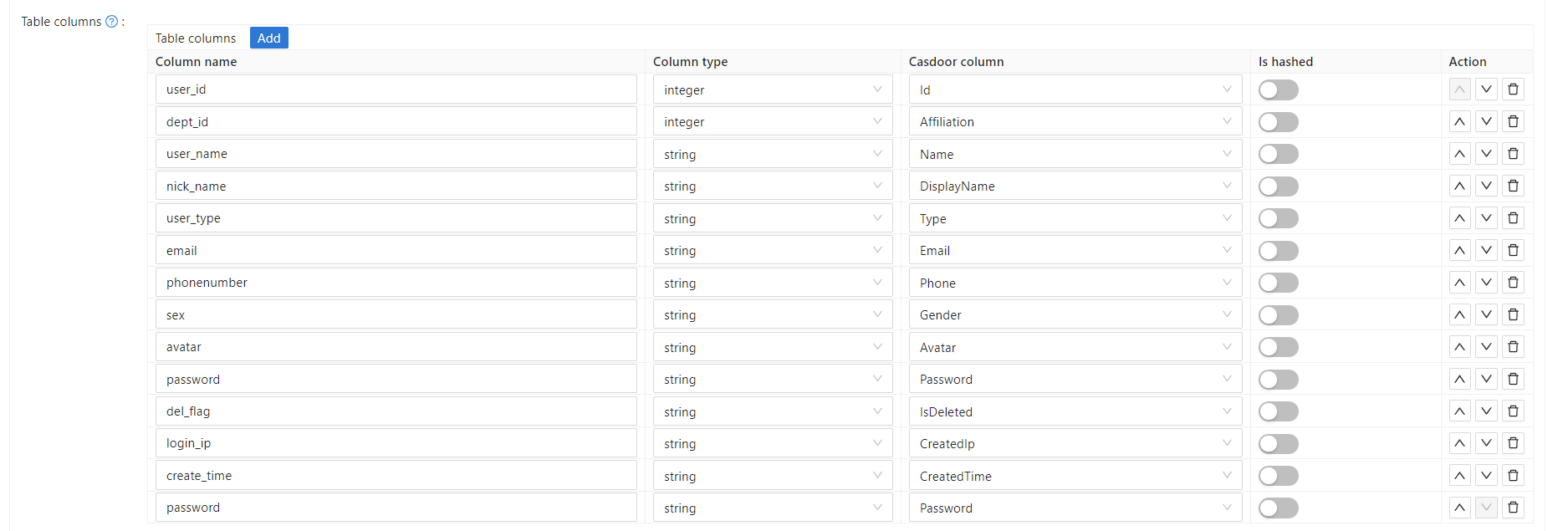 .
. - When editing the organization, select the correct password type:
 .
. - Enable soft deletion.
Step 3. Reform your front-end
3.1 Jump to Casdoor's login page
Use a frontend SDK (e.g. vue-sdk). After initializing it, get the Casdoor login URL with getSigninUrl().
Wire the link as needed and remove any redundant RuoYi-Cloud login UI (e.g. account/password inputs).
3.2 Accept the code and state returned by Casdoor
After successfully logging in through Casdoor, Casdoor sends the code and state to the page we set up. We can retrieve the code and state using the create() function.
created() {
    let url = window.document.location.href; // get URL
    let u = new URL(url);
    this.loginForm.code = u.searchParams.get('code'); // get code and state
    this.loginForm.state = u.searchParams.get('state');
    if (this.loginForm.code != null && this.loginForm.state != null) { // if code and state are not null, execute handleLogin
      this.handleLogin();
    }
}
For RuoYi-Cloud, we simply modify its original method of sending the account and password to send the code and state instead. Therefore, the change is only in what is sent to the backend, in relation to the original login.
Step 4: Refactor your back-end
4.1 Accept the code and state returned by the front-end
@PostMapping("login")
public R<?> callback(@RequestBody CodeBody code) {
    String token = casdoorAuthService.getOAuthToken(code.getCode(), code.getState());
    CasdoorUser casdoorUser = casdoorAuthService.parseJwtToken(token);
    if (casdoorUser.getName() != null) {
        String casdoorUserName = casdoorUser.getName();
        if (sysLoginService.getUserByCasdoorName(casdoorUserName) == null) {
            sysLoginService.casdoorRegister(casdoorUserName); // Add this user to the database if they don't exist
        }
    }
    LoginUser userInfo = sysLoginService.casdoorLogin(casdoorUser.getName()); // Get the user's information from the database
    return R.ok(tokenService.createToken(userInfo));
}
In this method, we are using the casdoor-SpringBoot-sdk method and making slight modifications to the RuoYi-Cloud method.
For example, the RuoYi-Cloud original method registers an account with a password. I have changed it to register an account using the casdoorRegister method.
I have also added a method getUserByCasdoorName to check if the account exists, and changed the method executeUserInfo to executeWithAccount to reflect this change.
This is an easy modification, as we only need to remove the part that checks the password.
Step 5: Summary
5.1 Front-end
- The existing login and register pages need to be removed.
- Additionally, the front-end needs to accept code and state parameters and send them to the back-end.
5.2 Back-end
The RuoYi back-end already has a well-implemented login and registration function. We just need to make some minor modifications, which makes the process highly convenient.
Step 6: Detailed Steps
-
Deploy and configure Casdoor. Be sure to select the bcrypt password type for the organization, as RuoYi-Cloud also uses bcrypt for passwords.
-
Use Casdoor syncers to copy database users to your Casdoor organization. This will import the original accounts into Casdoor.
-
After deploying Casdoor, make changes to the front-end. Disable the RuoYi check code.
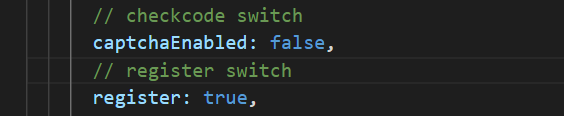
Note that the RuoYi-Cloud captcha needs to be disabled in Nacos again. Also, the RuoYi-Cloud registration function needs to be enabled by setting
sys.account.registerUsertotrue. -
Add a button for users to log in with Casdoor, and modify the data's
loginForm.
 The URL can also be obtained from Casdoor-Vue-SDK or Casdoor-SpringBoot-SDK.
 -
Since we are no longer using the original login method, delete the cookie and checkcode methods.
The new
createdfunction should look like this:created() {
let url = window.document.location.href; // Get the URL
let u = new URL(url);
this.loginForm.code = u.searchParams.get('code'); // Get the code and state
this.loginForm.state = u.searchParams.get('state');
if (this.loginForm.code != null && this.loginForm.state != null) { // If code and state are not null, execute handleLogin
this.handleLogin();
}
} -
In fact, we only need to change the parameter we send to the back-end and delete the unnecessary functions. No other changes are necessary.
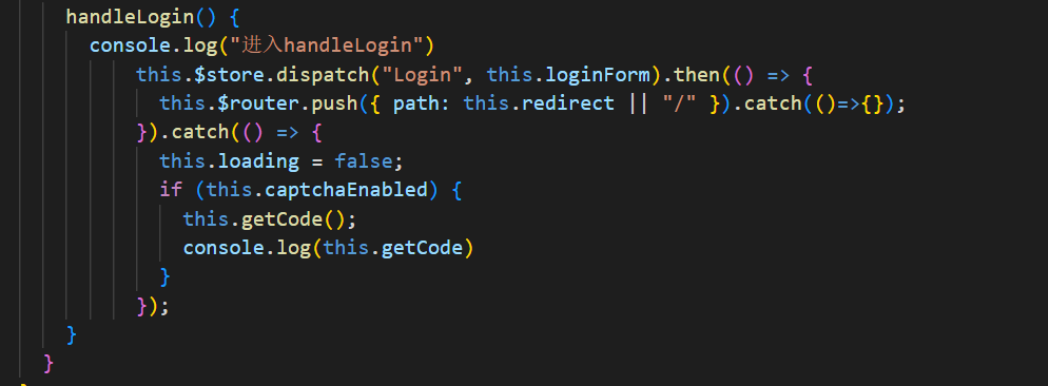
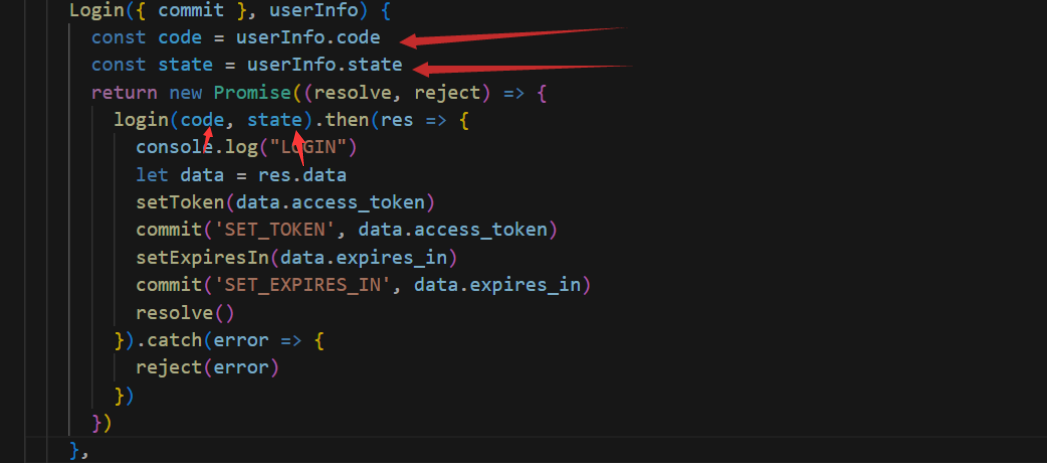
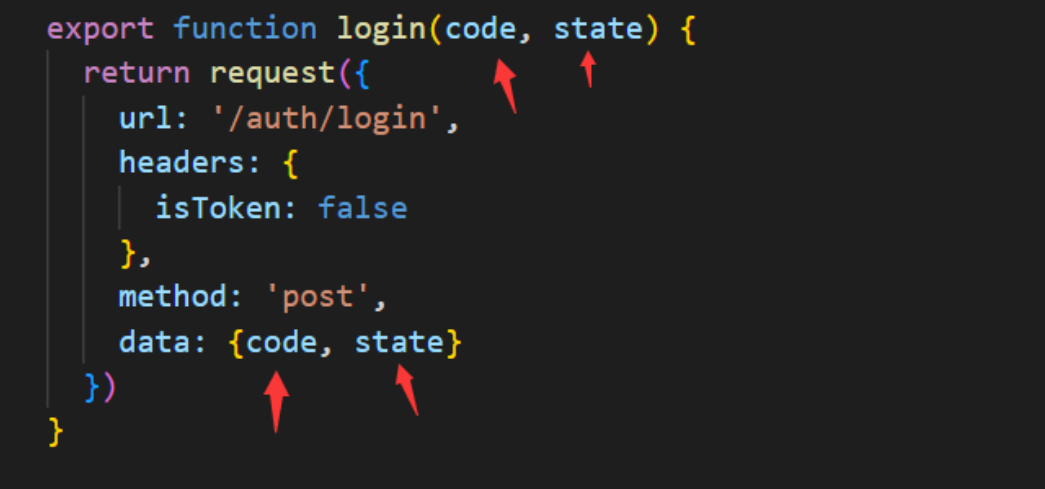
-
Import the required dependency in the back-end.
pom.xml<dependency>
<groupId>org.casbin</groupId>
<artifactId>casdoor-spring-boot-starter</artifactId>
<version>1.2.0</version>
</dependency>You also need to configure Casdoor in the resource file.
-
Define the callback function as the redirect function. Make changes to some methods in
sysLoginService. Delete the password check step because it is no longer needed.@PostMapping("login")
public R<?> callback(@RequestBody CodeBody code) {
// Define a CodeBody entity with code and state
String token = casdoorAuthService.getOAuthToken(code.getCode(), code.getState());
CasdoorUser casdoorUser = casdoorAuthService.parseJwtToken(token);
if (casdoorUser.getName() != null) {
String casdoorUserName = casdoorUser.getName();
if (sysLoginService.getUserByCasdoorName(casdoorUserName) == null) {
// If the user is not in the RuoYi-Cloud database but exists in Casdoor, create the user in the database
sysLoginService.casdoorRegister(casdoorUserName);
}
}
LoginUser userInfo = sysLoginService.casdoorLogin(casdoorUser.getName());
// Get the user's information from the database
return R.ok(tokenService.createToken(userInfo));
} -
Add new methods to
SysLoginService.public LoginUser casdoorLogin(String username) {
R<LoginUser> userResult = remoteUserService.getUserInfo(username, SecurityConstants.INNER);
// Execute the user
if (R.FAIL == userResult.getCode()) {
throw new ServiceException(userResult.getMsg());
}
if (StringUtils.isNull(userResult) || StringUtils.isNull(userResult.getData())) {
recordLogService.recordLogininfor(username, Constants.LOGIN_FAIL, "This user does not exist");
throw new ServiceException("User " + username + " does not exist");
}
LoginUser userInfo = userResult.getData();
SysUser user = userResult.getData().getSysUser();
if (UserStatus.DELETED.getCode().equals(user.getDelFlag())) {
recordLogService.recordLogininfor(username, Constants.LOGIN_FAIL, "Sorry, your account has been deleted");
throw new ServiceException("Sorry, your account " + username + " has been deleted");
}
if (UserStatus.DISABLE.getCode().equals(user.getStatus())) {
recordLogService.recordLogininfor(username, Constants.LOGIN_FAIL, "Your account is disabled. Please contact the administrator");
throw new ServiceException("Sorry, your account " + username + " is disabled");
}
recordLogService.recordLogininfor(username, Constants.LOGIN_SUCCESS, "Login successful");
return userInfo;
}public String getUserByCasdoorName(String casdoorUsername) {
R<LoginUser> userResult = remoteUserService.getUserInfo(casdoorUsername, SecurityConstants.INNER);
if (StringUtils.isNull(userResult) || StringUtils.isNull(userResult.getData())) {
// If the user is not in the RuoYi-Cloud database but exists in Casdoor, create the user in the database
return null;
}
String username = userResult.getData().getSysUser().getUserName();
return username;
}public void casdoorRegister(String username) {
if (StringUtils.isAnyBlank(username)) {
throw new ServiceException("User must provide a username");
}
SysUser sysUser = new SysUser();
sysUser.setUserName(username);
sysUser.setNickName(username);
R<?> registerResult = remoteUserService.registerUserInfo(sysUser, SecurityConstants.INNER);
System.out.println(registerResult);
if (R.FAIL == registerResult.getCode()) {
throw new ServiceException(registerResult.getMsg());
}
recordLogService.recordLogininfor(username, Constants.REGISTER, "Registration successful");
}