Spring Security filter (OIDC)
This guide integrates Casdoor with your application using Spring Security Filter and OIDC.
Step 1: Deploy Casdoor
Deploy the Casdoor server. After deployment, confirm:
- The Casdoor server is running at
http://localhost:8000. - The Casdoor login page is at
http://localhost:7001. - Test login with credentials
adminand123.
After verifying these steps, follow the steps below to integrate Casdoor with your application.
Step 2: Configure the Casdoor application
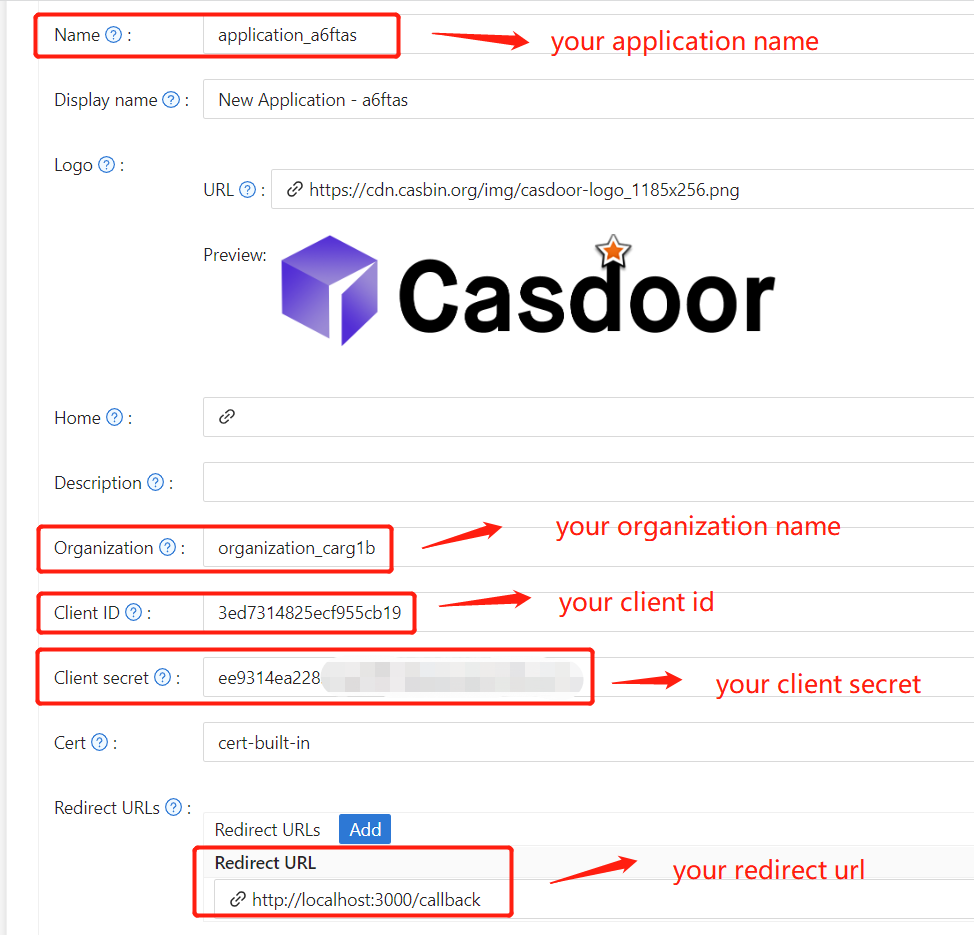
- Create or edit a Casdoor application and add your redirect URL (see next section for how to get it).
- Obtain your
Certificateon the certificate editing page.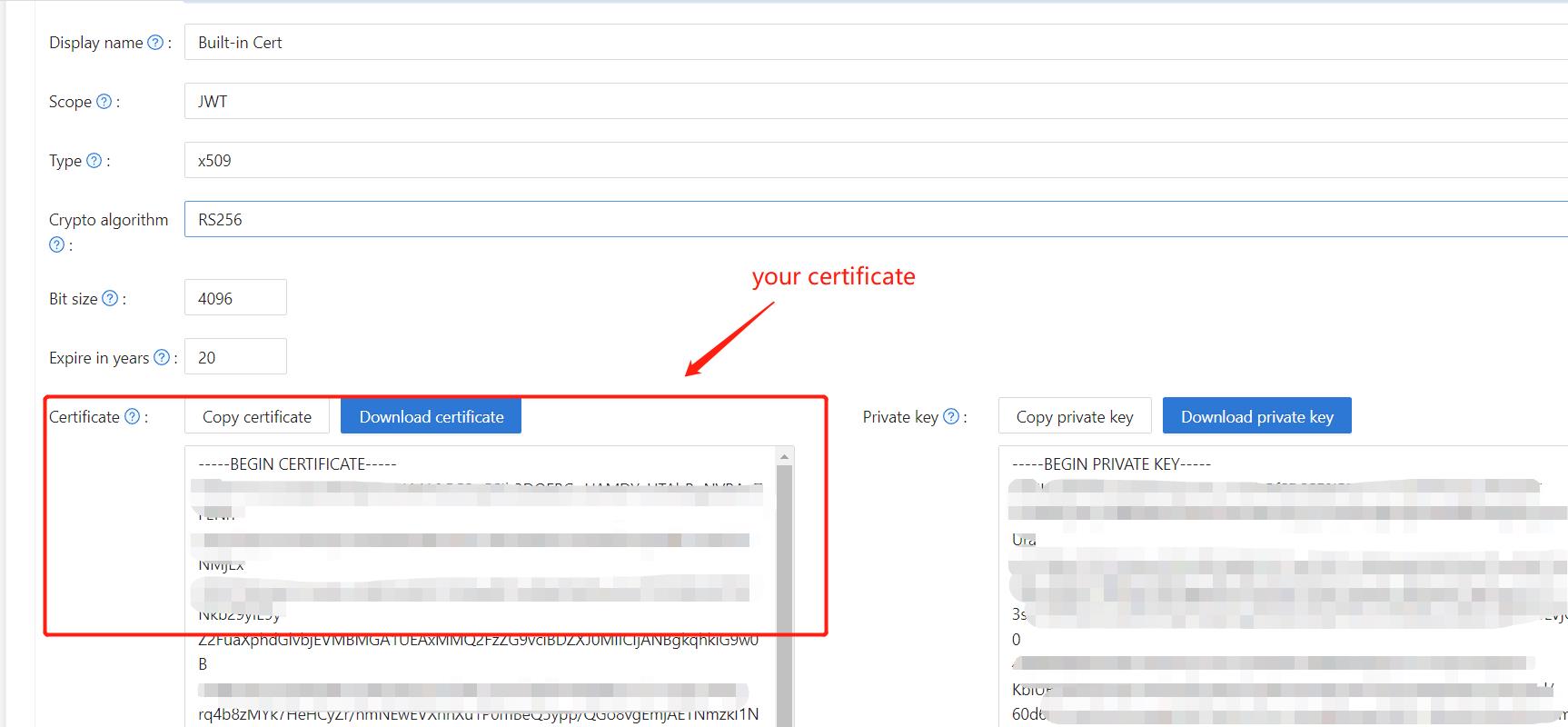
- Add the provider and other settings as needed.
Note Application Name, Organization Name, Redirect URL, Client ID, Client Secret, and Certificate from the application page for the next step.
Step 3: Configure Spring Security
Customize the Spring Security filter to process tokens:
Replace the placeholders with your own Casdoor instance (Client ID, Client secret, etc.).
server:
  port: 8080
casdoor:
  endpoint: http://CASDOOR_HOSTNAME:8000
  client-id: <Client ID>
  client-secret: <Client Secret>
  certificate: <Certificate>
  organization-name: <Organization Name>
  application-name: <Application Name>
  redirect-url: http://FRONTEND_HOSTNAME/callback
Default <FRONTEND_HOSTNAME> is localhost:3000; redirect URL is http://localhost:3000/callback. Add this redirect URL in the Casdoor application.
Step 4: Configure Frontend
Install casdoor-js-sdk and configure it as follows:
-
Install
casdoor-js-sdk.npm i casdoor-js-sdk
# or
yarn add casdoor-js-sdk -
Set up
SDK.import Sdk from "casdoor-js-sdk";
// Serverurl is the URL where spring security is deployed
export const ServerUrl = "http://BACKEND_HOSTNAME:8080";
const sdkConfig = {
serverUrl: "http://CASDOOR_HOSTNAME:8000",
clientId: "<your client id>",
appName: "<your application name>",
organizationName: "<your organization name>",
redirectPath: "/callback",
};
export const CasdoorSDK = new Sdk(sdkConfig);
Step 5: Set Up a Demo
-
Create a Spring Boot application.
-
Add some configurations to handle JWT.
@EnableWebSecurity
public class SecurityConfig {

    private final JwtTokenFilter jwtTokenFilter;

    public SecurityConfig(JwtTokenFilter jwtTokenFilter) {
        this.jwtTokenFilter = jwtTokenFilter;
    }

    @Bean
    public SecurityFilterChain securityFilterChain(HttpSecurity http) throws Exception {
        // enable CORS and disable CSRF
        http = http.cors(corsConfig -> corsConfig
                .configurationSource(configurationSource())
        ).csrf().disable();

        // set session management to stateless
        http = http
                .sessionManagement()
                .sessionCreationPolicy(SessionCreationPolicy.STATELESS)
                .and();

        // set permissions on endpoints
        http.authorizeHttpRequests(authorize -> authorize
                .mvcMatchers("/api/redirect-url", "/api/signin").permitAll()
                .mvcMatchers("/api/**").authenticated()
        );

        // set unauthorized requests exception handler
        http = http
                .exceptionHandling()
                .authenticationEntryPoint(
                        (request, response, ex) -> ResponseUtils.fail(response, "unauthorized")
                )
                .and();

        // add JWT token filter
        http.addFilterBefore(
                jwtTokenFilter,
                UsernamePasswordAuthenticationFilter.class
        );
        return http.build();
    }

    // ...

} -
Add a simple JWT filter to intercept requests that require token verification.
@Component
public class JwtTokenFilter extends OncePerRequestFilter {

    private final CasdoorAuthService casdoorAuthService;

    public JwtTokenFilter(CasdoorAuthService casdoorAuthService) {
        this.casdoorAuthService = casdoorAuthService;
    }

    @Override
    protected void doFilterInternal(HttpServletRequest request,
                                    HttpServletResponse response,
                                    FilterChain chain)
            throws ServletException, IOException {
        // get authorization header and validate
        final String header = request.getHeader(HttpHeaders.AUTHORIZATION);
        if (!StringUtils.hasText(header) || !header.startsWith("Bearer ")) {
            chain.doFilter(request, response);
            return;
        }

        // get jwt token and validate
        final String token = header.split(" ")[1].trim();

        // get user identity and set it on the spring security context
        UserDetails userDetails = null;
        try {
            CasdoorUser casdoorUser = casdoorAuthService.parseJwtToken(token);
            userDetails = new CustomUserDetails(casdoorUser);
        } catch (CasdoorAuthException exception) {
            logger.error("casdoor auth exception", exception);
            chain.doFilter(request, response);
            return;
        }

        UsernamePasswordAuthenticationToken authentication = new UsernamePasswordAuthenticationToken(
                userDetails,
                null,
                AuthorityUtils.createAuthorityList("ROLE_casdoor")
        );

        authentication.setDetails(
                new WebAuthenticationDetailsSource().buildDetails(request)
        );

        SecurityContextHolder.getContext().setAuthentication(authentication);
        chain.doFilter(request, response);
    }

}
When the user accesses the interface requiring authentication,
JwtTokenFilterwill obtain the token from the request headerAuthorizationand verify it. -
Define a
Controllerto handle when the user logs in to Casdoor. After the user logs in, they will be redirected to the server and carry thecodeandstate. The server then needs to verify the user's identity from Casdoor and obtain thetokenthrough these two parameters.@RestController
public class UserController {
private static final Logger logger = LoggerFactory.getLogger(UserController.class);
private final CasdoorAuthService casdoorAuthService;
// ...
@PostMapping("/api/signin")
public Result signin(@RequestParam("code") String code, @RequestParam("state") String state) {
try {
String token = casdoorAuthService.getOAuthToken(code, state);
return Result.success(token);
} catch (CasdoorAuthException exception) {
logger.error("casdoor auth exception", exception);
return Result.failure(exception.getMessage());
}
}
// ...
}
Step 6: Try the Demo
Open the frontend in a browser. When not logged in, a login button is shown; clicking it redirects to the Casdoor login page.
If you visit your root page,

Click the Casdoor Login button, and the page will redirect to Casdoor's login page.
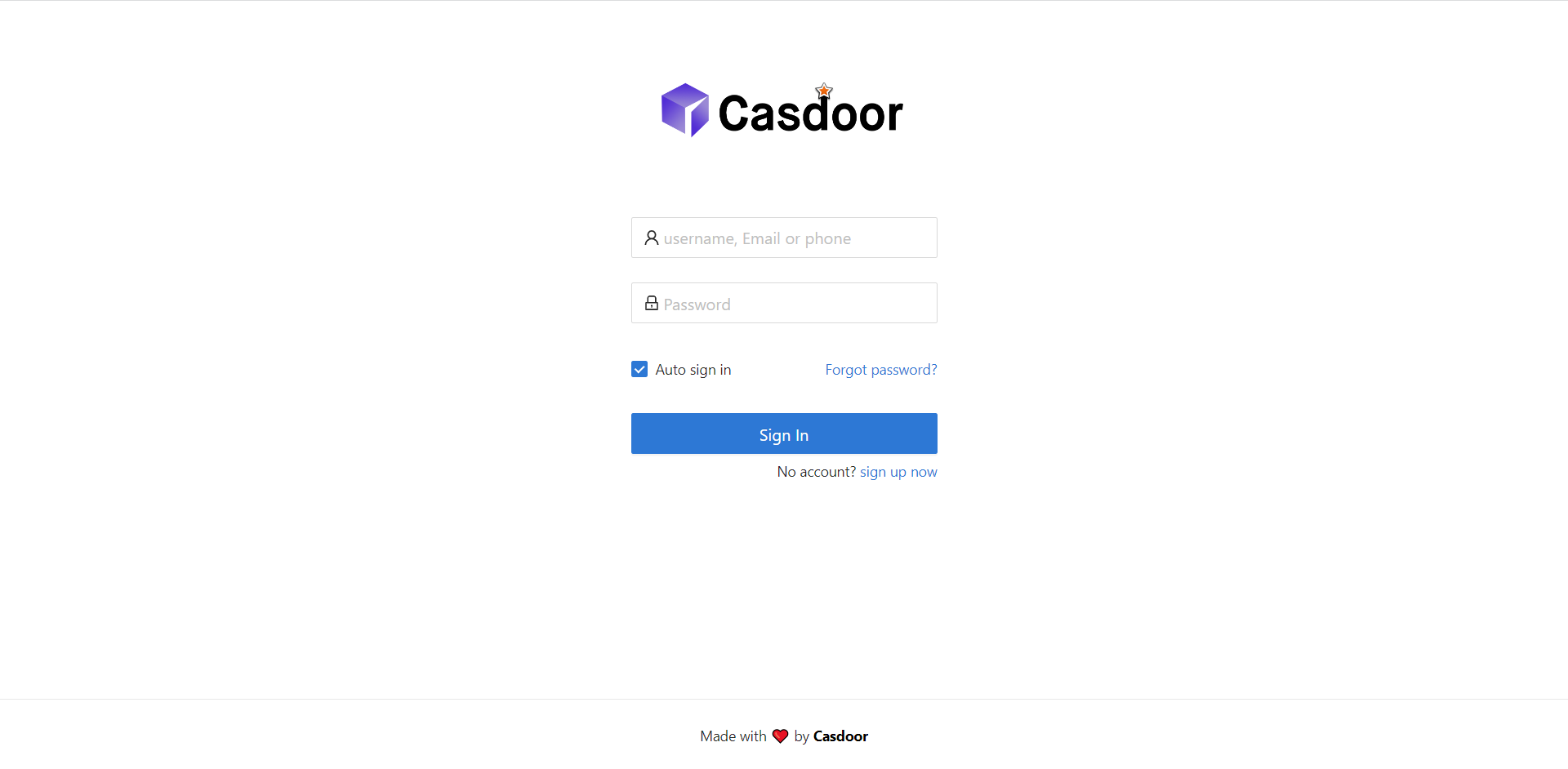
After login, the app redirects to /.