ภาพรวม
Casdoor สามารถถูกตั้งค่าเพื่อรองรับการเข้าสู่ระบบผู้ใช้งาน UI โดยใช้ตัวตนจากผู้ให้บริการด้านตัวตนภายนอกที่รองรับ SAML 2.0 ในการตั้งค่านี้, Casdoor ไม่เคยเก็บข้อมูลรับรองใดๆ ของผู้ใช้
ตอนนี้, Casdoor รองรับผู้ให้บริการแอปพลิเคชัน SAML หลายราย ไอคอนของผู้ให้บริการจะถูกแสดงบนหน้าเข้าสู่ระบบหลังจากถูกเพิ่มเข้าไปใน Casdoor นี่คือผู้ให้บริการที่ Casdoor รองรับ:
| Alibaba Cloud IDaaS | Keycloak | กำหนดเอง |
|---|---|---|
 |  |  |
| ✅ | ✅ | ✅ |
ข้อกำหนด
- ผู้ให้บริการด้านตัวตน (IDP) - บริการที่เก็บฐานข้อมูลตัวตนและให้บริการด้านตัวตนและการรับรองความถูกต้องกับ Casdoor
- ผู้ให้บริการ (SP) - บริการที่ให้ทรัพยากรแก่ผู้ใช้ปลายทาง, ในกรณีนี้คือการติดตั้ง Casdoor
- บริการรับข้อมูลการยืนยัน (ACS) - ผู้บริโภคของการยืนยัน SAML ที่ถูกสร้างโดยผู้ให้บริการด้านตัวตน
Configuration Values for Casdoor as SP
When configuring an external Identity Provider (such as Google Workspace, Azure AD, or other SAML IdPs), you'll typically need to provide the following values:
ACS URL (Assertion Consumer Service URL): This is the endpoint where the IdP will send SAML assertions. For Casdoor, use:
https://<your-casdoor-domain>/api/acs(replace<your-casdoor-domain>with your actual Casdoor domain, e.g.,https://door.example.com/api/acs)Entity ID (SP Entity ID): This uniquely identifies your Casdoor instance as a Service Provider. Use the same URL as the ACS URL:
https://<your-casdoor-domain>/api/acsRequest Method: The
/api/acsendpoint only accepts POST requests. Ensure your IdP is configured to send SAML responses via HTTP POST binding.
User Attribute Mapping
When a user authenticates through SAML, Casdoor extracts user information from the SAML assertion based on your provider's attribute mapping configuration. The username field is particularly important as it's required for user identification and creation in Casdoor.
If your IdP doesn't explicitly provide a username mapping or the username field comes back empty, Casdoor automatically applies a fallback strategy:
- First, it attempts to use the email address from the SAML assertion as the username
- If no email is available, it falls back to the NameID (unique identifier) from the assertion
This fallback mechanism ensures smooth authentication even when username attributes aren't explicitly configured in your IdP, which is common with providers like Azure AD where the default attribute claims might not include a separate username field.
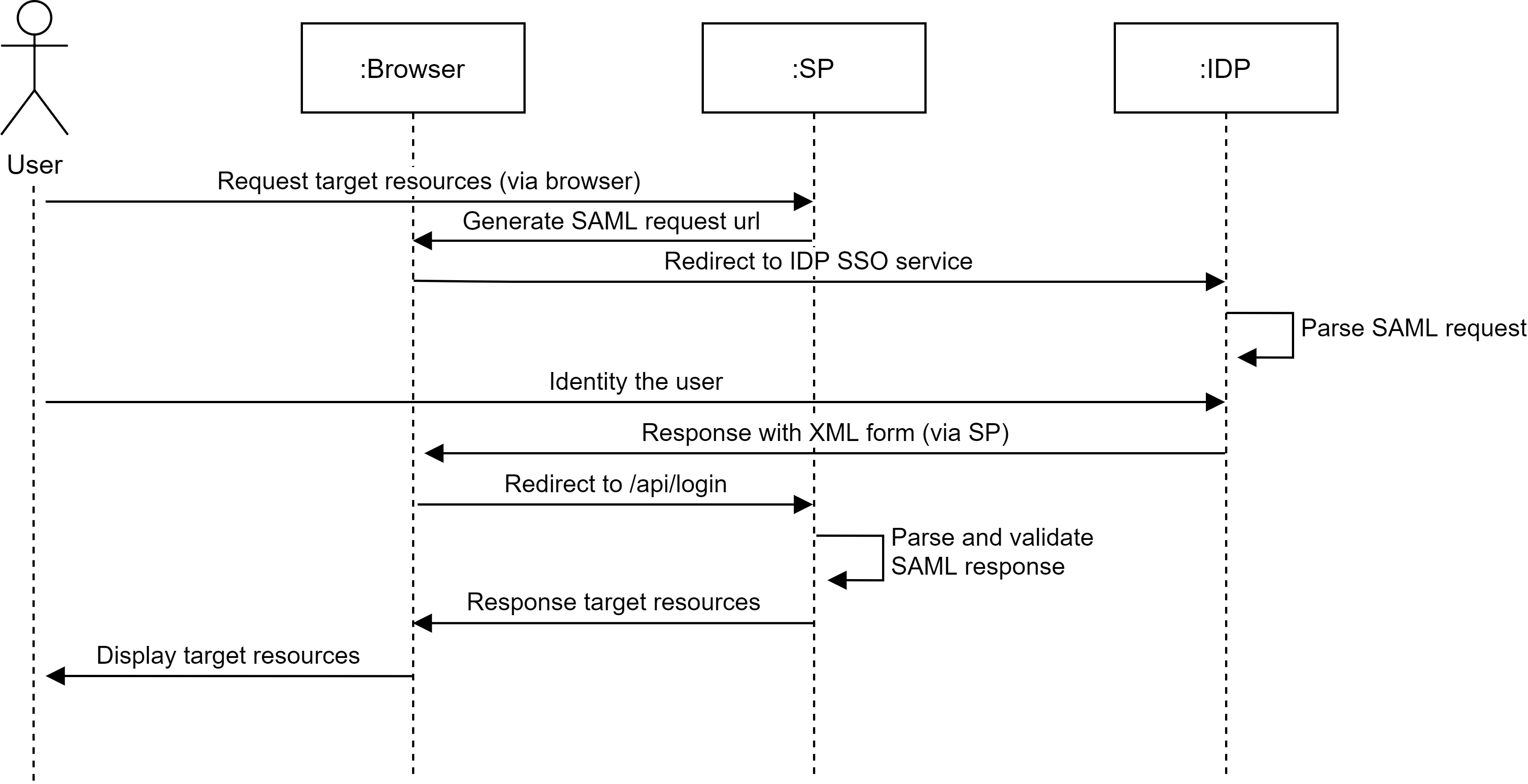
วิธีการทำงานของการรวม SAML
เมื่อใช้ SAML SSO, ผู้ใช้เข้าสู่ระบบ Casdoor ผ่านผู้ให้บริการด้านตัวตนโดยไม่ต้องผ่านข้อมูลรับรองใดๆ ไปยัง Casdoor ความคืบหน้าจะแสดงในแผนภาพต่อไปนี้