SAML provider overview
Casdoor can act as a SAML 2.0 Service Provider (SP) so users sign in with an external Identity Provider (IdP). Casdoor does not store user credentials; authentication is handled by the IdP.
Supported SAML providers: Alibaba Cloud IDaaS, Keycloak, Custom. After adding a provider, its icon appears on the login page.
| Alibaba Cloud IDaaS | Keycloak | Custom |
|---|---|---|
 |  |  |
| ✅ | ✅ | ✅ |
Terms
- Identity Provider (IdP) — The service that holds identities and authenticates users (e.g. Keycloak, Azure AD).
- Service Provider (SP) — The application that protects resources; here, Casdoor.
- Assertion Consumer Service (ACS) — The endpoint that receives SAML assertions from the IdP.
Configuring the external IdP (Casdoor as SP)
When you set up the external IdP (e.g. Google Workspace, Azure AD), use these values for Casdoor:
-
ACS URL (Assertion Consumer Service URL): This is the endpoint where the IdP will send SAML assertions. For Casdoor, use:
https://<your-casdoor-domain>/api/acs(replace<your-casdoor-domain>with your actual Casdoor domain, e.g.,https://door.example.com/api/acs) -
Entity ID (SP Entity ID): This uniquely identifies your Casdoor instance as a Service Provider. Use the same URL as the ACS URL:
https://<your-casdoor-domain>/api/acs -
Request Method: The
/api/acsendpoint only accepts POST requests. Ensure your IdP is configured to send SAML responses via HTTP POST binding.
User Attribute Mapping
When a user authenticates through SAML, Casdoor extracts user information from the SAML assertion based on your provider's attribute mapping configuration. The username field is particularly important as it's required for user identification and creation in Casdoor.
If your IdP doesn't explicitly provide a username mapping or the username field comes back empty, Casdoor automatically applies a fallback strategy:
- First, it attempts to use the email address from the SAML assertion as the username
- If no email is available, it falls back to the NameID (unique identifier) from the assertion
This fallback mechanism ensures smooth authentication even when username attributes aren't explicitly configured in your IdP, which is common with providers like Azure AD where the default attribute claims might not include a separate username field.
Login Behavior
Unlike OAuth providers which auto-redirect when configured as the sole authentication method, SAML providers always display their button on the login page. This design ensures users explicitly choose to authenticate via SAML before being redirected to their identity provider. Even with a single SAML provider configured, clicking the provider button is required to initiate the login flow.
This behavior prevents unexpected redirects and gives users clear control over the authentication method they're using, which is particularly important in enterprise environments where SAML is often one of multiple authentication options.
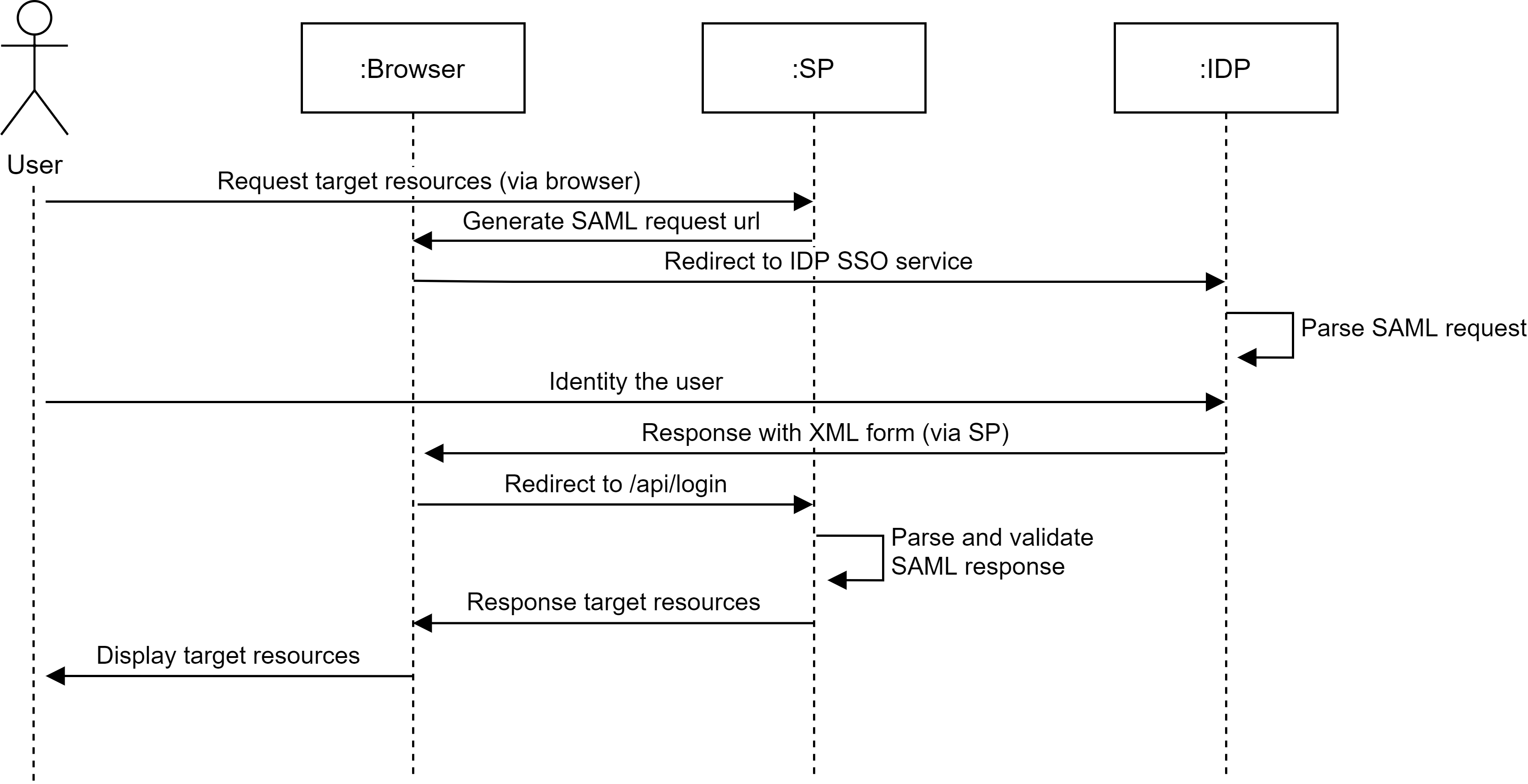
How SAML integration works
When using SAML SSO, users log into Casdoor via the identity provider without ever passing credentials to Casdoor. The progress is shown in the following diagram.