概要
Casdoor is built on OAuth and uses tokens for user authentication and authorization.
Access token and ID token
In Casdoor, access_token and id_token are the same. Both contain the same JWT payload (user info and claims). This design keeps token handling simple.
This approach means:
- Both tokens contain the same user information and custom claims
- Both tokens can be used interchangeably for authentication and authorization
- The token format and expiration settings apply to both tokens equally
- You cannot configure separate claims for
access_tokenandid_token
Token fields
Casdoor tokens include these fields:
OwnerNameCreatedTimeApplicationOrganizationUserCodeAccessTokenExpireIn(トークンの有効期限は時間)Scope(認可の範囲)TokenType(例:Bearerタイプ)
Token lifecycle and invalidation
When a user signs in, Casdoor issues an access token and a refresh token. The access token is used for API authentication; the refresh token is used to obtain new access tokens without re-authenticating.
On SSO logout, Casdoor invalidates tokens by setting ExpiresIn to 0 or a negative value. The token introspection and refresh endpoints check this field and reject tokens with ExpiresIn <= 0, so refresh tokens cannot be used after logout. This gives full session termination across all token types.
Token format options
When issuing JWTs, choose among four formats:
JWTJWT-EmptyJWT-CustomJWT-Standard
The token format options behave as follows:
- JWT: includes all User fields in the token payload
- JWT-Empty: includes only non-empty User fields
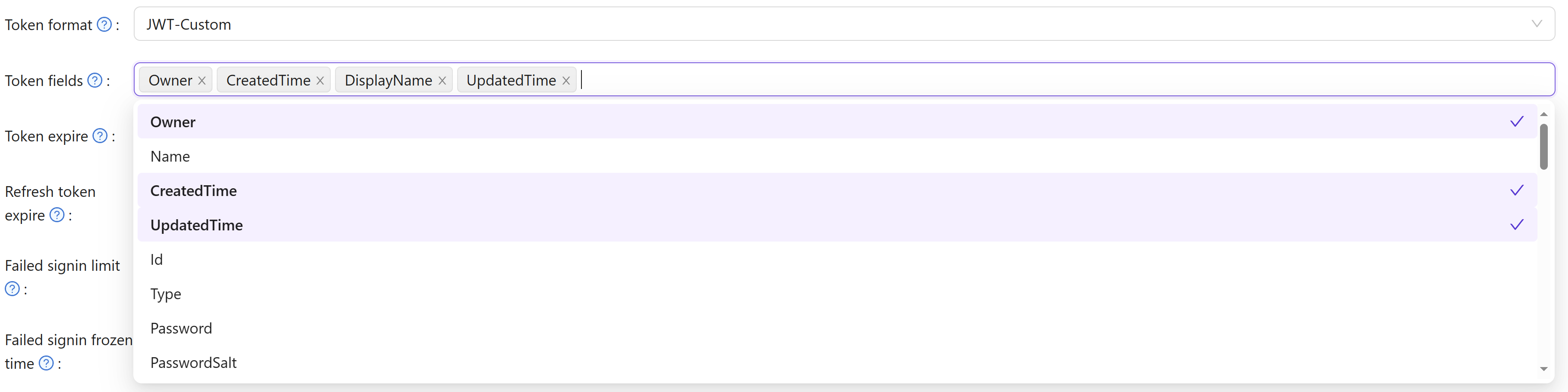
- JWT-Custom: includes the custom User Token fields you select (choose attributes in the Token fields)
- JWT-Standard: includes standard OIDC claims (email, phone, gender, address) in OIDC-compliant format
Only JWT-Standard produces an OIDC-compliant address claim. In JWT, JWT-Empty, and JWT-Custom formats the address field is included as a raw []string array (the user's Address property), which does not conform to the OIDC specification. If your application parses the address claim as an object, use the JWT-Standard token format.
OIDC Address Claim
The OIDC specification defines the address claim as a JSON object with the following fields:
| Field | Description |
|---|---|
formatted | Full mailing address, formatted for display |
street_address | Street address component (may include house number, street name, P.O. box, etc.) |
locality | City or locality |
region | State, province, prefecture, or region |
postal_code | Zip code or postal code |
country | Country name |
How Casdoor maps user data to the address claim
Casdoor stores address information in two separate user fields:
Location(string): A general location string (e.g.,"New York"). This field is used as the plain-stringaddressvalue returned by the/api/userinfoendpoint when theaddressscope is requested.Address(array of strings): An array of address-line strings (e.g.,["123 Main St", "Anytown, NY 12345", "USA"]). This field is the source for the OIDC-compliantaddressclaim in JWT-Standard tokens.
JWT-Standard address claim
When the address scope is requested and the JWT-Standard format is used, Casdoor returns the following object in the token:
{
  "address": {
    "street_address": "123 Main St\nAnytown, NY 12345\nUSA",
    "formatted": "",
    "locality": "",
    "region": "",
    "postal_code": "",
    "country": ""
  }
}
The street_address field contains the user's Address array entries joined with newlines. The remaining OIDC address sub-fields (formatted, locality, region, postal_code, country) are currently empty because Casdoor stores the entire address as free-form lines in the Address array rather than in per-component fields.
Non-standard formats (JWT, JWT-Empty, JWT-Custom)
In JWT, JWT-Empty, and JWT-Custom token formats, the address field is the raw Address property of the user object — a JSON array of strings — not an OIDC address object:
{
  "address": ["123 Main St", "Anytown, NY 12345", "USA"]
}
OIDC clients that expect the address claim to be a JSON object (per the OIDC spec) will fail to parse this. Switch to JWT-Standard if you need a spec-compliant address claim in the token.
Standard OIDC Claims
All JWT token formats include these standard OpenID Connect claims in the payload:
sub- Subject identifier (unique user ID)email- User's email addressemail_verified- Boolean indicating whether the email has been verified by Casdoornameorpreferred_username- User's display namepictureoravatar- User's avatar URL
The email_verified claim enables external applications using Casdoor as an identity provider to determine email verification status directly from the token without additional API calls.
Custom Token Attributes
With JWT-Custom format, define custom attributes and their data types. Each attribute has a Type field that controls how values are included in the JWT:
- Array: The attribute value will always be returned as an array, even if it contains a single element. This ensures compatibility with OIDC clients that expect array types for fields like roles, groups, or permissions.
- String: The attribute value will be returned as a single string (the first element if multiple values exist).
Empty attributes are automatically omitted from the token to keep the payload clean. When configuring attributes for roles, groups, or permissions, using the Array type is recommended for better OIDC compliance and compatibility with systems like Rancher and Keycloak.